JavaScript is the backbone of modern web development. Whether you’re applying for a frontend, backend (Node.js), or full-stack role, mastering JavaScript is crucial. This comprehensive guide covers 100+ essential JavaScript interview questions and answers to help you prepare and ace your next interview.
Table of Contents
- JavaScript Basics
- Data Types & Variables
- Functions & Scope
- Objects & Arrays
- DOM Manipulation
- ES6+ Features
- Asynchronous JavaScript
- Error Handling
- Advanced Concepts
- JavaScript Best Practices & Tips
1. JavaScript Basics
Q1: What is JavaScript?
JavaScript is a lightweight, interpreted, high-level programming language primarily used to make web pages interactive. It can run in the browser and on servers with Node.js.
Q2: Key features of JavaScript?
Dynamic typing, first-class functions, event-driven, object-oriented, interpreted, supports asynchronous programming.
Q3: Difference between Java and JavaScript?
Java: statically typed, compiled, used for backend/desktop apps.
JavaScript: dynamically typed, interpreted, used for frontend and server-side (Node.js) apps.
Q4: What are the data types in JavaScript?
String, Number, Boolean, Undefined, Null, Symbol, BigInt, Object.
Q5: Difference between == and ===?== compares values after type coercion.=== compares values and type strictly.
Q6: What is NaN?
Represents “Not a Number.” Occurs when a mathematical operation fails.
Q7: Difference between null and undefined?undefined = variable declared but not initialized.null = variable explicitly assigned no value.
Q8: What is isNaN() function?
Checks if a value is NaN, but converts the value to a number first (type coercion). Example:
isNaN(123);     // false
isNaN("abc");   // true
isNaN("123");   // false (string "123" converts to number 123)
isNaN(undefined); // true (undefined converts to NaN)
Better alternative: Use Number.isNaN() which doesn’t perform type coercion:
Number.isNaN(NaN); // true
Number.isNaN("abc"); // false (no conversion)
Q9: What is “strict mode”?
Enables stricter parsing and error handling in JavaScript:
"use strict";
x = 10; // throws error if x is undeclared
Q10: Difference between window and document objects?window = global object in browser, represents browser window.document = represents HTML document inside window.
2. Data Types & Variables
Q11: Difference between var, let, and const?
- var: function-scoped, can be redeclared, hoisted and initialized with
undefined - let: block-scoped, cannot redeclare in same scope, hoisted but in temporal dead zone
- const: block-scoped, cannot redeclare or reassign, hoisted but in temporal dead zone
Temporal Dead Zone: let and const variables cannot be accessed before declaration:
console.log(x); // ReferenceError
let x = 5;
Q12: What is hoisting?
JavaScript moves variable and function declarations to the top of their scope before execution.
Q13: What are template literals?
Strings allowing embedded expressions using backticks:
let name = "Alice";
console.log(`Hello ${name}`); // Hello Alice
Q14: Difference between primitive and reference types?
- Primitive: Number, String, Boolean, Symbol, Null, Undefined, BigInt (immutable, stored by value)
- Reference: Objects, Arrays, Functions (stored by reference)
Q15: What is type coercion?
Automatic conversion of one data type to another. Example:
"5" + 1 // "51" (string)
"5" - 1 // 4 (number)
Q16: How to check data type in JavaScript?
typeof 123;        // "number"
typeof "hello";    // "string"
typeof null;       // "object" (historical bug in JavaScript)
typeof undefined;  // "undefined"
typeof [];         // "object"

// Better type checking for specific cases:
Array.isArray([]); // true
value === null;    // check for null specifically
Q17: What is Symbol in JavaScript?
A unique and immutable identifier:
let sym = Symbol("id");
Q18: What is BigInt?
Represents integers larger than Number.MAX_SAFE_INTEGER:
const big = 123456789012345678901234567890n;
Q19: Difference between Object.freeze() and Object.seal()?
freeze()= cannot change values or add/remove propertiesseal()= can change values but cannot add/remove properties
Q20: How to convert string to number?
Number("123"); // 123
parseInt("123"); // 123
3. Functions & Scope
Q21: What are first-class functions?
Functions can be assigned to variables, passed as arguments, and returned from other functions.
Q22: Function declaration vs expression?
Declaration: hoisted, can be called before definition.
Expression: not hoisted, defined at runtime.
Q23: What is IIFE?
Immediately Invoked Function Expression:
(function() { console.log("IIFE"); })();
Q24: What are closures?
A function accessing variables from its parent scope even after parent execution.
function outer() {
  let count = 0;
  return function() { count++; return count; }
}
const counter = outer();
console.log(counter()); // 1
console.log(counter()); // 2
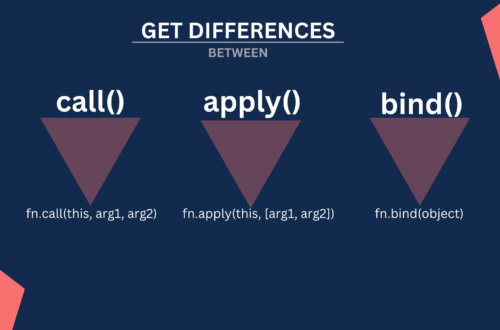
Q25: Difference between call(), apply(), bind()?
call()= invoke withthisand args separatelyapply()= invoke withthisand args as arraybind()= returns new function with boundthis
Q26: What is this keyword?
Refers to object executing current function. Context-dependent.
Q27: Difference between normal function and arrow function?
Arrow functions:
- Do not have their own
this(inherit from enclosing scope) - Cannot be used as constructors (no
new) - Do not have
argumentsobject - Do not have
superbinding - Do not have
new.target - Cannot be used as generators (no
yield)
Q28: What is recursion?
Function calling itself:
function factorial(n) { return n <= 1 ? 1 : n * factorial(n-1); }
Q29: What are default parameters?
function greet(name="Guest") { console.log(`Hello ${name}`); }
Q30: What is rest and spread operator?
- Rest:
function f(...args) {}collects remaining parameters - Spread:
let arr2 = [...arr1]expands elements
4. Objects & Arrays
Q31: What is an object in JavaScript?
Collection of key-value pairs.
let person = { name: "Alice", age: 25 };
Q32: How to clone an object?
let clone = { ...person }; // shallow copy
Q33: Difference between shallow and deep copy?
Shallow copy copies only top-level properties; deep copy copies nested objects as well.
Q34: How to iterate an array?
arr.forEach(el => console.log(el));
for(let val of arr) { console.log(val); }
Q35: Difference between for...in and for...of?
for...initerates keysfor...ofiterates values
Q36: What are map(), filter(), reduce()?
map()transforms arrayfilter()selects elementsreduce()accumulates a single value
Q37: How to check if a variable is an array?
Array.isArray(arr); // true/false
Q38: Difference between push() and unshift()?push() adds to end, unshift() adds to start.
Q39: Difference between pop() and shift()?pop() removes from end, shift() removes from start.
Q40: Difference between slice() and splice()?
slice()returns a shallow copy of array portionsplice()modifies array in place
5. DOM Manipulation
Q41: What is DOM?
Document Object Model represents HTML structure for scripting.
Q42: How to select elements?
document.getElementById("id")
document.querySelector(".class")
Q43: Difference between innerHTML and textContent?innerHTML = HTML contenttextContent = only text
Q44: How to add event listeners?
element.addEventListener("click", () => console.log("Clicked"));
Q45: What is event delegation?
Attach a single event listener to a parent element to handle events for its children.
Q46: How to create elements dynamically?
let div = document.createElement("div");
div.textContent = "Hello";
document.body.appendChild(div);
Q47: Difference between getElementsByClassName and querySelectorAll?
getElementsByClassName: Returns live HTMLCollection that automatically updates when DOM changes
querySelectorAll: Returns static NodeList that doesn’t update after DOM changes
let liveList = document.getElementsByClassName("item"); // live
let staticList = document.querySelectorAll(".item");    // static

// Add new element with class "item"
document.body.innerHTML += '<div class="item">New</div>';

console.log(liveList.length);   // Updates automatically
console.log(staticList.length); // Remains same
Q48: What is the difference between bubbling and capturing?
- Bubbling: event propagates from target to root
- Capturing: event propagates from root to target
Q49: What is preventDefault()?
Stops default browser action for an event.
Q50: What is stopPropagation()?
Stops event from bubbling or capturing further.
6. ES6+ Features
Q51: What is ES6?
Modern JavaScript (2015) with features like let, const, arrow functions, template literals, classes, modules.
Q52: What are JavaScript classes?
class Person { constructor(name){ this.name=name } greet(){ console.log(this.name) } }
Q53: What are modules?
Separate files with export/import syntax for reusable code.
Q54: What is destructuring?
const {name, age} = person;
const [x, y] = arr;
Q55: What are default parameters?
Function parameters with default values:
function greet(name="Guest"){}
Q56: What is the spread operator?
Expands iterable elements:
let arr2 = [...arr1];
Q57: What is rest parameter?
Collects remaining arguments:
function f(...args){ console.log(args) }
Q58: What are template literals?
Strings using backticks with embedded expressions:
`Hello ${name}`
Q59: What is let and const?
Block-scoped variables. const cannot be reassigned.
Q60: Difference between var and let?var = function-scoped, let = block-scoped.
7. Asynchronous JavaScript
Q61: Difference between synchronous and asynchronous code?
Synchronous executes sequentially; asynchronous executes independently.
Q62: What is a Promise?
Represents a value that may be available now, later, or never.
let p = new Promise((resolve, reject) => { resolve("Done"); });
Q63: What is async/await?async returns a promise; await pauses execution until promise resolves.
Q64: Difference between callbacks and promises?
Promises avoid callback hell and allow chaining.
Q65: What is the event loop?
Mechanism that handles asynchronous callbacks in JavaScript.
Q66: Difference between microtasks and macrotasks?
Microtasks (higher priority):
- Promise callbacks (
.then(),.catch(),.finally()) queueMicrotask()MutationObserverasync/await
Macrotasks (lower priority):
setTimeout(),setInterval()- DOM events
- I/O operations
Execution order: All microtasks execute before any macrotask:
setTimeout(() => console.log("macrotask"), 0);
Promise.resolve().then(() => console.log("microtask"));
// Output: "microtask", "macrotask"
Q67: How to handle multiple promises?
Promise.all([p1,p2]).then(results=>console.log(results));
Promise.race([p1,p2]).then(result=>console.log(result));
Q68: What is fetch()?
Browser API for making HTTP requests, returns a promise.
Q69: How to cancel fetch requests?
Using AbortController.
Q70: What is AJAX?
Asynchronous JavaScript and XML; fetches data without reloading the page.
8. Error Handling
Q71: How to handle errors in JavaScript?
try { throw new Error("Error!") } catch(err){ console.error(err); }
Q72: Difference between throw and return?throw = raises an exception; return = returns value from function.
Q73: What is finally block?
Always executes regardless of errors.
Q74: Common JavaScript error types?
- SyntaxError
- ReferenceError
- TypeError
- RangeError
- EvalError
Q75: What is try/catch?
Handles runtime errors to prevent crashes.
9. Advanced Concepts
Q76: What are prototypes?
Objects from which other objects inherit properties.
Q77: Difference between __proto__ and prototype?__proto__ = object’s prototypeprototype = object used for inheritance by constructor
Q78: What are higher-order functions?
Functions that take or return other functions.
Q79: What is currying?
Transforming a function with multiple arguments into a sequence of functions with single arguments:
// Regular function
function add(a, b, c) { return a + b + c; }

// Curried version
const curriedAdd = a => b => c => a + b + c;

// Usage
const add5 = curriedAdd(5);
const add5and10 = add5(10);
const result = add5and10(15); // 30

// Practical example - partial application
const multiply = a => b => a * b;
const double = multiply(2);
const triple = multiply(3);

[1, 2, 3, 4].map(double); // [2, 4, 6, 8]
Q80: What is memoization?
Optimization to cache results of expensive function calls.
Q81: Difference between shallow and deep copy?
Shallow copy = first-level copy
Deep copy = recursive copy of all nested objects
Q82: What is JSON?
JavaScript Object Notation; lightweight data interchange format.
Q83: Difference between JSON.stringify and JSON.parse?
- stringify = JS object to JSON string
- parse = JSON string to JS object
Q84: What are web storage options?
- LocalStorage = persists across sessions
- SessionStorage = clears on tab close
- Cookies = small data with server communication
Q85: Difference between synchronous and asynchronous loops?
Synchronous blocks next iteration; asynchronous allows other code to run in parallel.
Q86: What is debounce and throttle?
- Debounce = delays function until after inactivity
- Throttle = limits function call rate
Q87: Difference between setTimeout and setInterval?setTimeout = executes oncesetInterval = executes repeatedly
Q88: What are service workers?
Scripts that run in background, enabling offline support and caching.
Q89: What is event delegation?
Using a single event listener on a parent element to handle events for its children, leveraging event bubbling. Benefits include better performance and automatic handling of dynamically added elements.
// Instead of adding listeners to each button
document.getElementById("parent").addEventListener("click", (e) => {
  if (e.target.tagName === "BUTTON") {
    console.log("Button clicked:", e.target.textContent);
  }
});
Q90: What is shadow DOM?
Encapsulation mechanism for web components to avoid style/script conflicts.
10. JavaScript Best Practices & Tips
Q91: Avoid global variables?
Encapsulate in IIFE or modules, use let/const.
Q92: Why avoid eval()?
Security risk and performance issues.
Q93: How to improve performance?
- Minimize DOM access
- Use async operations
- Use event delegation
Q94: Difference between == and ===?
== (loose equality): Compares values after type coercion
=== (strict equality): Compares values and types without coercion
"5" == 5;   // true (string converts to number)
"5" === 5;  // false (different types)
null == undefined;  // true (special case)
null === undefined; // false
Q95: How to prevent memory leaks?
Remove unused references, avoid global variables, manage closures carefully.
Q96: How to debug JavaScript?
Use console.log, debugger keyword, browser dev tools.
Q97: What are JavaScript design patterns?
- Singleton
- Module
- Observer
- Factory
Q98: How to secure JavaScript code?
Avoid eval, validate input, escape HTML, use HTTPS.
Q99: Difference between client-side and server-side JavaScript?
Client-side = runs in browser (UI)
Server-side = runs on server (Node.js)
Q100: Difference between synchronous and asynchronous API calls?
Synchronous = waits for response
Asynchronous = continues execution while waiting
Q101: Difference between localStorage and sessionStorage?
LocalStorage = persists until cleared
SessionStorage = persists only for session/tab
Q102: What are JavaScript frameworks?
Pre-written JS libraries to build applications: React, Angular, Vue.
Q103: Difference between nullish coalescing ?? and OR ||??? = only null or undefined|| = falsy values (0, “”, null, undefined, false)
const value1 = 0 ?? "default";     // 0
const value2 = 0 || "default";     // "default"
const value3 = null ?? "default";  // "default"
const value4 = "" ?? "default";    // ""
Q104: What is optional chaining ?.?
Prevents error if property is undefined:
// Without optional chaining
if (obj && obj.prop && obj.prop.subprop) {
  console.log(obj.prop.subprop);
}

// With optional chaining
console.log(obj?.prop?.subprop);

// Also works with methods and arrays
obj?.method?.();
arr?.[index]?.prop;
Q105: How to handle multiple async operations?Promise.all, Promise.race, async/await loops.
✅ Conclusion
Preparing for a JavaScript interview can feel overwhelming given the language’s depth and modern features. However, by practicing these 100+ essential questions, covering everything from core concepts, ES6+ features, DOM manipulation, asynchronous programming, to best practices, you can build strong confidence and sharpen your problem-solving skills.
Remember, interviews not only test your theoretical knowledge but also your ability to apply concepts in real-world scenarios. Keep practicing coding challenges, revisiting tricky topics, and experimenting with your own projects to reinforce your learning.
With consistent preparation and hands-on practice, you’ll be ready to tackle any JavaScript interview, whether it’s for frontend, backend (Node.js), or full-stack roles.