Modern software development is no longer just about writing code — it’s about automating everything around it: testing, building, securing, releasing, and deploying. Manual processes are slow, error-prone, and don’t scale well.
That’s where GitHub Actions comes in.
GitHub Actions is GitHub’s built-in automation and CI/CD platform that lets you define workflows directly inside your repository. With it, you can automatically run tests when code changes, deploy applications when releases are created, scan for security issues, and even automate project management tasks.
This guide explains GitHub Actions from the ground up — how it works, why it matters, and how to use it effectively in real-world projects.
🔹 What Is GitHub Actions?
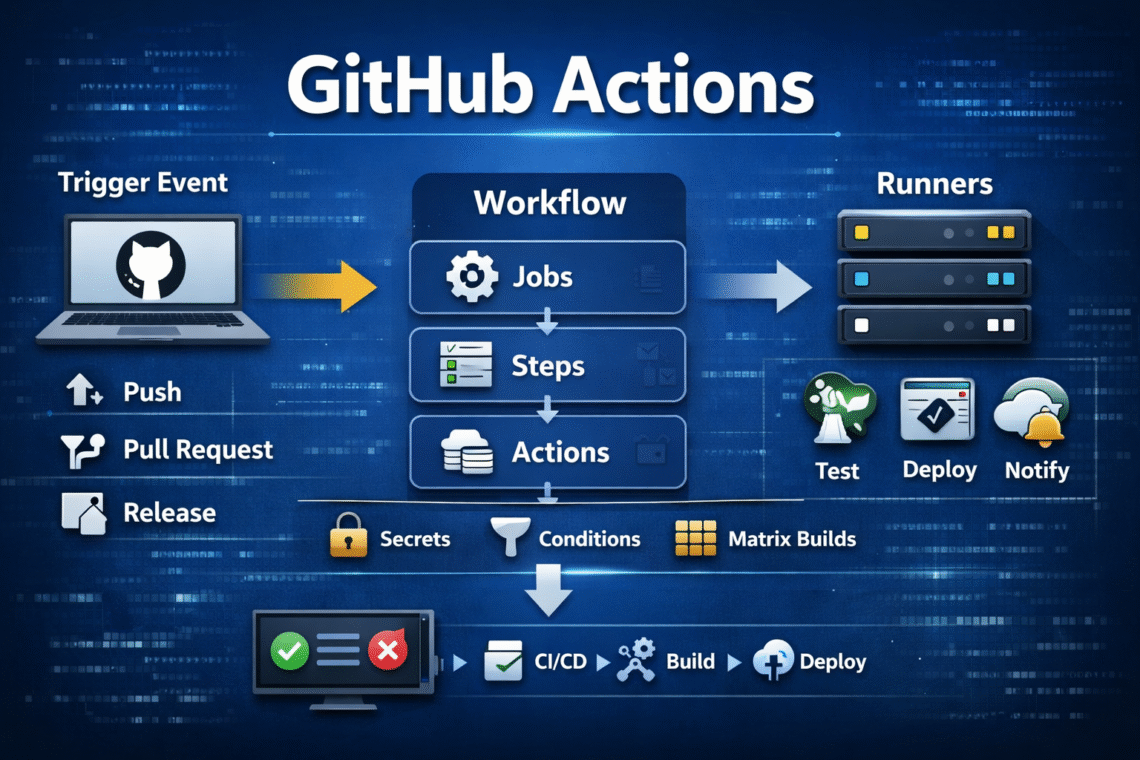
GitHub Actions is an automation engine that reacts to events in your GitHub repository and runs workflows in response.
Think of it as:
Event → Workflow → Jobs → Steps → Result
For example:
- When code is pushed → run tests
- When a pull request is opened → run linting and security scans
- When a release is published → deploy the application
Everything is defined using simple YAML files and runs inside GitHub’s infrastructure.
🔹 Why GitHub Actions Matters
Before GitHub Actions, teams relied heavily on external CI/CD tools like Jenkins, Travis CI, or CircleCI. While powerful, they required additional setup, maintenance, and integration.
GitHub Actions simplifies this by:
- Being native to GitHub
- Using configuration stored directly with your code
- Providing a huge marketplace of reusable actions
- Supporting all major languages and platforms
It makes automation accessible to every developer, not just DevOps engineers.
🔹 Core Concepts
Understanding these building blocks makes GitHub Actions easy to use:
| Concept | Description |
|---|---|
| Workflow | A YAML file defining automation rules |
| Event | The trigger (push, PR, schedule, manual, etc.) |
| Job | A set of steps running on one runner |
| Step | A single command or action |
| Action | A reusable automation component |
| Runner | The virtual machine executing jobs |
🔹 How GitHub Actions Works
- A developer performs an action (push, PR, release, etc.)
- GitHub detects the event
- The matching workflow starts
- Jobs are assigned to runners
- Steps execute in order
- Results are reported back in GitHub UI
Everything is traceable, visible, and reproducible.
🔹 Example: Basic CI Workflow
name: CI Pipeline

on: [push]

jobs:
  test:
    runs-on: ubuntu-latest
    steps:
      - uses: actions/checkout@v4
      - name: Install dependencies
        run: npm install
      - name: Run tests
        run: npm test
This runs tests automatically on every push.
🔹 Matrix Builds: Test Across Multiple Environments
Matrix builds allow you to run the same job across multiple environment combinations.
Example: OS + Node.js Matrix
jobs:
  build:
    runs-on: ${{ matrix.os }}
    strategy:
      matrix:
        os: [ubuntu-latest, windows-latest, macos-latest]
        node-version: [18, 20]

    steps:
      - uses: actions/checkout@v4
      - uses: actions/setup-node@v4
        with:
          node-version: ${{ matrix.node-version }}
      - run: npm install
      - run: npm test
This runs 6 builds automatically (3 OS × 2 Node versions).
🔹 Using Secrets Securely
Secrets store sensitive data like API keys and passwords securely.
- Add secrets in repository settings.
- Use them in workflows via
${{ secrets.NAME }}.
Example:
env:
  API_KEY: ${{ secrets.PRODUCTION_API_KEY }}
Secrets never appear in logs or code.
🔹 Conditional Logic
Use conditions to control when jobs or steps run.
Example: Only deploy from main
if: github.ref == 'refs/heads/main'
Example: Only scan on PR
if: github.event_name == 'pull_request'
This prevents unnecessary or risky operations.
🔹 Popular GitHub Marketplace Actions
| Action | Purpose |
|---|---|
| actions/checkout | Clone repo |
| actions/setup-node | Setup Node.js |
| actions/setup-python | Setup Python |
| docker/build-push-action | Build Docker images |
| aws-actions/configure-aws-credentials | Authenticate AWS |
| slackapi/slack-github-action | Send Slack alerts |
| codecov/codecov-action | Upload test coverage |
| sonarsource/sonarqube-scan-action | Code quality |
🔹 Best Practices
- Keep workflows small and focused
- Use caching to speed up builds
- Pin action versions (
@v4) - Protect secrets carefully
- Monitor failures regularly
- Avoid overloading a single workflow
🔹 When Should You Use GitHub Actions?
Use GitHub Actions when you:
- Host code on GitHub
- Want built-in CI/CD
- Need automation without managing servers
- Want visibility and traceability in pipelines
🧩 Final Thoughts
GitHub Actions turns GitHub into more than a code repository — it becomes a complete automation platform for modern software development.
Whether you’re shipping a personal project or running enterprise systems, GitHub Actions helps you build faster, deploy safer, and scale confidently.
Once you start using it, manual processes quickly feel like a thing of the past.