Most teams start with the same GitHub Actions pattern: run tests, build the project, and deploy. That baseline is useful, but it only scratches the surface of what the platform can do.
Over the last few years, GitHub Actions has quietly grown into a powerful automation layer for engineering organizations. If you design pipelines intentionally, Actions can improve build throughput, reduce cloud spend, raise deployment safety, and remove repetitive operational work from developers.
This guide walks through high-impact features that many teams still underuse, along with practical ways to apply them in real CI/CD systems.
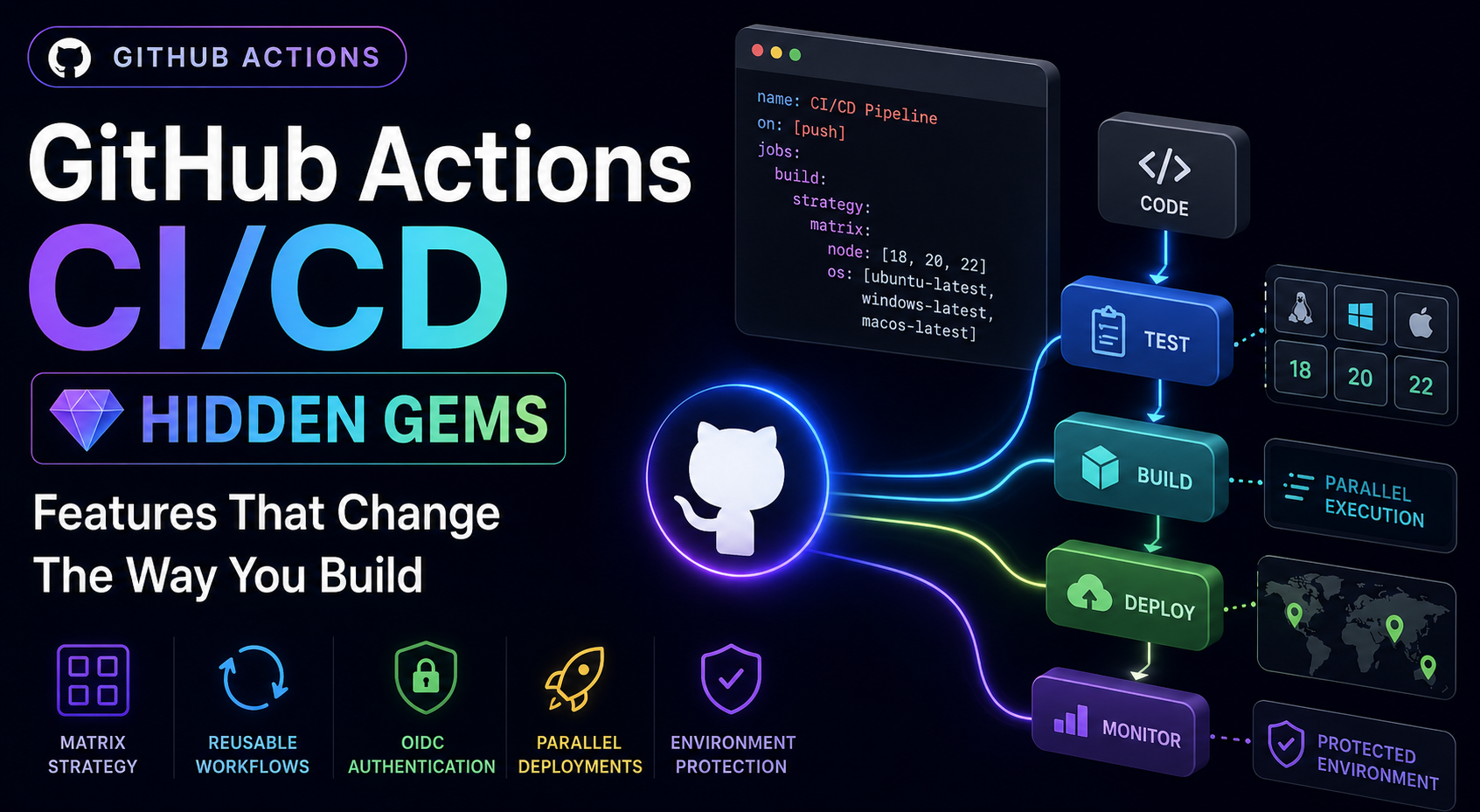
1. Matrix Strategy: Parallel CI/CD at Scale
Matrix strategy lets you define test and build combinations once, then run them in parallel without duplicating YAML. Instead of creating separate jobs for each OS, runtime, or architecture, you describe dimensions in a matrix and let GitHub generate all combinations.
Example:
strategy:
  matrix:
    os: [ubuntu-latest, windows-latest]
    node: [18, 20, 22]
This produces six jobs automatically, which gives fast feedback on compatibility and catches environment-specific failures early.
Where matrix strategy is most valuable:
- Libraries that support multiple language/runtime versions
- Applications that need OS-level confidence
- Monorepos where each package has different runtime requirements
- Regional or tenant-specific deployment targets
Hidden superpower: dynamic matrix generation
Static matrices are useful, but dynamic matrices are where large teams get major efficiency gains. You can compute matrix entries at runtime based on changed files, affected services, or deployment targets.
Examples:
- Only frontend files changed: run web lint, test, and build jobs
- Only payment service changed: run payment tests and deploy flow
- Only docs changed: skip expensive build and deployment stages
This pattern can significantly reduce:
- Build time
- Infrastructure cost
- Queue congestion
It also improves developer experience because engineers no longer wait for unrelated jobs.
2. Reusable Workflows: End YAML Duplication
As repositories grow, workflow sprawl becomes a maintenance problem. Teams often copy build, deploy, and security logic into many repos and then struggle to keep behavior consistent.
Reusable workflows solve this by centralizing workflow logic in one place and calling it from other repositories.
Common duplicated workflows:
- Build
- Deploy
- Docker publish
- Security scan
Reusable pattern:
jobs:
  deploy:
    uses: company/platform/.github/workflows/deploy.yml@main
    with:
      service: payment-api
      environment: production
Operational benefits:

- One centrally maintained source of truth
- Organization-wide consistency for release behavior
- Faster rollout of improvements and security fixes

This approach is especially powerful for platform teams, multi-repo organizations, and regulated environments that need repeatable release controls.
3. Composite Actions: Build Internal DevOps Building Blocks
Composite actions package repeated step sequences into reusable internal building blocks. They are ideal for task-level standardization, while reusable workflows are better for full pipeline-level standardization.
Instead of repeating:
- Setup Node
- Install dependencies
- Configure cache
- Authenticate cloudYou can create and reuse an internal action such as:
uses: ./.github/actions/setup-node-project
Why this matters:
- Standardized pipelines
- Shared internal tooling
- Lower maintenance
- Cleaner workflow filesThink of composite actions as an internal DevOps library. Once teams trust these building blocks, onboarding gets faster and workflows become easier to review.
4. Concurrency Control: Prevent Deployment Collisions
Concurrency is one of the most underrated safety features in GitHub Actions. Without it, two runs can deploy the same environment at the same time, causing race conditions, failed migrations, and partially rolled out releases.
Use:
concurrency:
  group: production-deploy
  cancel-in-progress: true
With this configuration:
- Only one deploy in the group runs at a time
- Older in-progress runs can be canceled
- Race conditions are reduced
High-value use cases:
- Production deploys
- Database migrations
- Terraform pipelines
You can also scope the concurrency group by environment or service name, which enables safe parallelism across independent systems.
5. Environments and Deployment Protection Rules
Environments and protection rules turn GitHub Actions into a release management layer, not just a script runner. You can model the full release path from staging to production with explicit controls.
Define environments like:
- staging
- qa
- production
Then attach governance controls such as:
- Required approvals
- Environment-specific secrets
- Deployment restrictions
- Wait timers
Example flow:
- Staging deploys automatically
- Production requires approval from a release owner
This creates a safer promotion model with clear ownership and auditability.
6. OIDC Authentication: Passwordless Cloud Deployments
Many pipelines still rely on long-lived cloud credentials in CI secrets. That model works, but it increases risk because leaked secrets can be reused until rotated.
OIDC federation is a stronger model:
- No long-lived cloud keys in CI
- Short-lived, scoped tokens
- Stronger security posture
Typical pattern:
- GitHub issues an identity token
- Cloud provider validates trust relationship
- Workflow receives temporary credentials
In practice, this means less secret management overhead and better blast-radius control. It is one of the highest-impact CI/CD security upgrades a team can make.
7. Dependency Caching: Major Speed Gains
Dependency and build caching directly affects developer feedback loops. Without effective caching, every run redownloads dependencies and rebuilds layers from scratch.
Without caching:
- Dependencies reinstall every run
- Build layers regenerate unnecessarily
With good cache keys and restore strategies, pipeline times can drop significantly.
Common cache targets:
- Node modules or package manager cache
- Gradle and Maven caches
- Docker build layers
- Python package caches
In large monorepos or high-frequency commit environments, this can save substantial compute time and lower CI costs materially.
8. Job Outputs: Smarter Workflow Chaining
Job outputs allow workflows to pass structured values between jobs in a clean and explicit way.
Example:
- Build job emits a Docker image tag
- Deploy job reads and uses that exact tag
This improves release traceability and prevents drift between what was built and what was deployed. It also reduces brittle string duplication across jobs.
9. Conditional Execution: Run Only What Matters
Not every workflow path should execute on every commit. Conditional execution lets you model intent and keep pipelines efficient.
Use conditions to control behavior, for example:
if: github.ref == 'refs/heads/main'
You can also gate by event type, file changes, tags, labels, or commit metadata.
This enables:
- Selective testing
- Smart release gating
- Context-aware automation
The result is lower CI noise and faster signal for developers.
10. Self-Hosted Runners: Advanced Scale and Control
GitHub-hosted runners are convenient and usually the right starting point. Self-hosted runners become attractive when you need specialized hardware, network locality, or strict runtime control.
Best for:
- GPU/ML workloads
- Android builds
- Large container builds
- Private network dependencies
Benefits:
- Hardware customization
- Potentially faster execution
- Better cost control at scale
To use self-hosted runners safely, invest in runner lifecycle management, patching, and isolation policies.
11. Artifact Sharing: Build Once, Reuse Everywhere
Artifacts let one job publish outputs that other jobs can consume later in the workflow.
Example:
- Build frontend once
- Upload compiled assets
- Download in deploy jobs
This avoids redundant rebuilds, reduces inconsistency between stages, and speeds up multi-stage pipelines where the same output is needed by multiple jobs.
12. Service Containers: Real Integration Testing in CI
If your application depends on infrastructure services, service containers provide a clean way to run realistic integration tests in CI.
Example:
services:
  postgres:
    image: postgres:16
This allows tests to run against real backing services, including:
- PostgreSQL
- Redis
- MongoDB
- Other service dependencies
Because these services are provisioned with the job, teams get better test fidelity without maintaining shared external test infrastructure.
13. Workflow Dispatch: Manual Operations as a Control Plane
Manual triggers with typed inputs are a practical way to handle operational tasks that should be controlled but repeatable.
Use cases:
- Trigger a rollback
- Run one-off migrations
- Deploy a specific service
- Select region or environment
With clear inputs and guardrails, GitHub Actions becomes an internal operations console that reduces ad-hoc scripts and tribal knowledge.
14. Scheduled Workflows: Automation Beyond CI/CD
GitHub Actions is not limited to push and pull request events. Scheduled workflows can run operational automation continuously.
Common scheduled automations:
- Nightly backups
- Security scans
- Dependency updates
- Data sync jobs
- Report generation
Example:
schedule:
  - cron: "0 2 * * *"
This extends GitHub into a lightweight automation platform for recurring engineering and platform operations.
15. Monorepo Path Filtering: Optimize Pipeline Cost and Time
Monorepos often suffer from broad, expensive workflows where every change triggers every pipeline. Path filtering limits execution to only impacted areas.
Path filters let workflows run only when relevant files change, for example:
paths:
  - "frontend/**"
When combined with dynamic matrices and reusable workflows, path filtering can dramatically improve build efficiency and team throughput.
The Bigger Shift: GitHub Actions as an Engineering Platform
Many teams still think, “GitHub Actions just runs scripts.”
In mature engineering organizations, Actions is increasingly used as a programmable automation platform for:
- Platform engineering
- Infrastructure orchestration
- Release management
- Security automation
- Cloud federation
- Internal tooling
The major shift is architectural: workflows become standardized products, not one-off automation files.
A High-Impact Architecture Pattern
A common advanced flow looks like this:
Path filtering -> Dynamic matrix generation -> Reusable workflows -> OIDC cloud authentication -> Parallel deployments -> Concurrency controls -> Environment approval gates
At that point, GitHub Actions is no longer just CI/CD plumbing. It becomes a scalable, policy-aware automation platform that supports both development velocity and operational reliability.
Final Thoughts
Most teams still use only a small portion of GitHub Actions.
But once you adopt features like:
- Matrix builds
- Reusable workflows
- Composite actions
- OIDC authentication
- Concurrency control
- Smart caching
- Conditional and dynamic pipelines
You can build delivery systems that are:
- Faster
- Safer
- More cost-efficient
- Easier to scale
- Easier to maintain
That is where GitHub Actions becomes truly transformative, not just as a CI/CD tool, but as a core engineering automation platform.